ROB RUN Best Settings for More FPS and Less Stutter
Settings for your kind of PC, the official fix for FPS drops when you move the mouse, and whether your PC can run it.
Settings for your PC
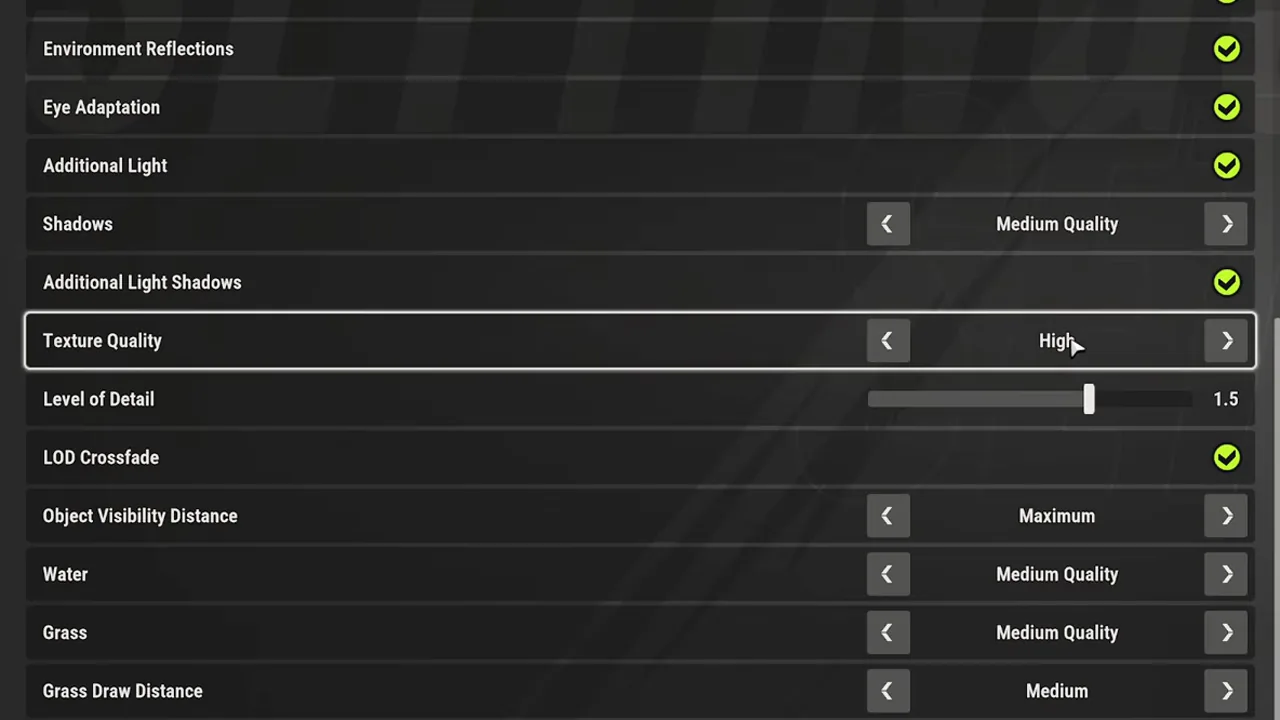
Open Esc, then Settings, then Graphics, and set Graphics Quality to Custom. These are the values the settings guides below agree on; the other seven settings are further down.
| Setting | High-end PC | Mid PC | Low-end PC |
|---|---|---|---|
| Render Resolution | 1.0 | 1.0 | 0.8–0.9 |
| Shadows | Medium Quality | Low Quality | Disabled |
| HBAO, Additional Light | On | Off | Off |
| Texture Quality | High | High | Medium |
| Level of Detail | 1.0–1.5 | 1.0 | 0.8 |
| Grass | Medium Quality | Low Quality | Minimum Quality |
| Water | Medium or High | Medium or High | Low Quality |
| VSync, Motion Blur | Off | Off | Off |
Can my PC run it?
- Minimum GPU
- GTX 1050 Ti / RX 580 / Arc A380
- Recommended GPU
- RTX 2070 / RX 5700 XT / Arc B570
- RAM
- 12 GB minimum, 16 GB recommended
- System
- Windows 10 or later, 64-bit, DirectX 11
- Disk space
- 20 GB
Near the minimum, start from the low-end column. At the recommended level or above, start from high-end. Full table: system requirements.
Stutters only when you move the mouse? That is Kefir's own fix: lower your mouse's polling rate. Steps below.
The other graphics settings
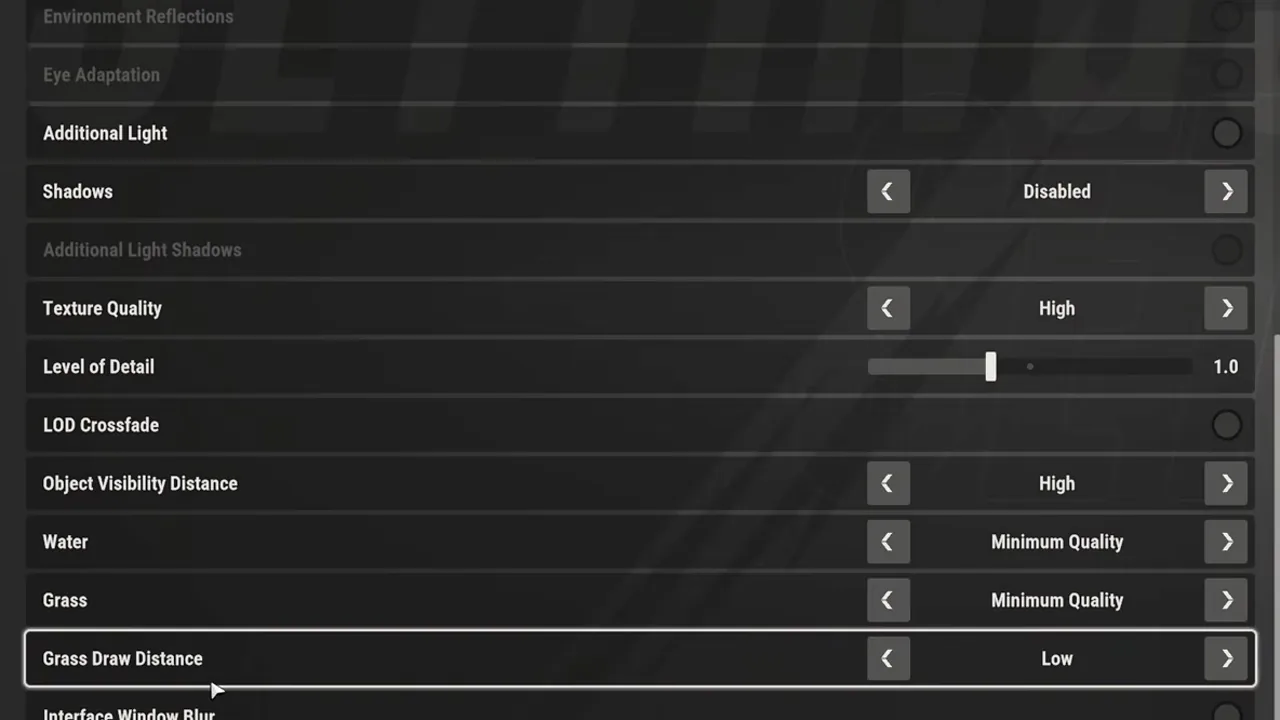
The quick table above covers the eight settings that cost the most frames. These are the rest of the Graphics tab. The high-end column takes the values where Fuzzi Official ツ (RTX 5070) and SimDEX agree. Each low-end value is one at least two of SimDEX, Lex, Kephren, This is Shran and hone.gg agree on. A range means the guides split.
| Setting | High-end PC | Mid PC | Low-end PC |
|---|---|---|---|
| Fullscreen | On | On | On |
| Anti-aliasing | MSAA x2 or x4 SMAA | MSAA x2 SMAA | Disabled |
| Post-processing | On | On | Off |
| Depth of Field | Off | Off | Off |
| Environment Reflections | On | On | Off |
| Object Visibility Distance | Maximum | High | High |
| Grass Draw Distance | Medium | Medium | Low |
The mid column is the high-end set with the four settings SimDEX says to cut first when frames drop: Shadows, HBAO, Additional Light and Grass. Texture Quality and Render Resolution stay, because lowering them blurs the picture for little gain, per SimDEX.
Frame Rate: SimDEX says to pick a cap your PC can hold (60, 90 or 120), Lex and ShowGamer say to cap it at your monitor's refresh rate with VSync off. Turning Post-processing off greys out HDR, Motion Blur, Depth of Field, HBAO, Environment Reflections and Eye Adaptation in one go, as Kephren's video shows.
Players who want to spot others at range keep Object Visibility Distance on Maximum even on a weak PC (Lex, This is Shran). This is Shran calls Level of Detail the biggest FPS win; he and Lex both run it at 0.8.
Fix FPS drops and stutter
If the game runs smoothly while you stand still and drops to single digits when you move the mouse, Kefir's help center says your mouse polling rate is too high.
Lower the polling rate
Open your mouse's app (Logitech, Razer, Bloody and so on), find "Polling Rate" and lower it. hone.gg and ShowGamer both suggest 1000 Hz first, then 500 Hz if it still stutters. Leave DPI as it is.
Update your graphics driver
Kefir's next step if the stutter stays.
Update your BIOS
Kefir flags this especially for 13th and 14th Gen Intel processors.
Turn off overlays
Kefir names Discord and GeForce Experience.
Close what you don't need
For crashes, Kefir's advice is to close unused apps and restart the PC.
To see whether a change helped, turn on Settings, Other, Display performance metrics: it shows FPS, ping and packet loss in game (hone.gg, ShowGamer, Lex). Falling FPS while you turn the camera is your PC; high ping or loss is the connection, which no graphics setting fixes (hone.gg).
On a laptop with two graphics chips, ShowGamer's tip is Windows Settings, System, Display, Graphics: set ROB RUN to High performance so it runs on the dedicated GPU.
More fixes by symptom: not loading.
Settings that help in a fight
Two settings outside the Graphics tab come up in every settings video: one shows sounds on screen, one puts a crosshair on your car.
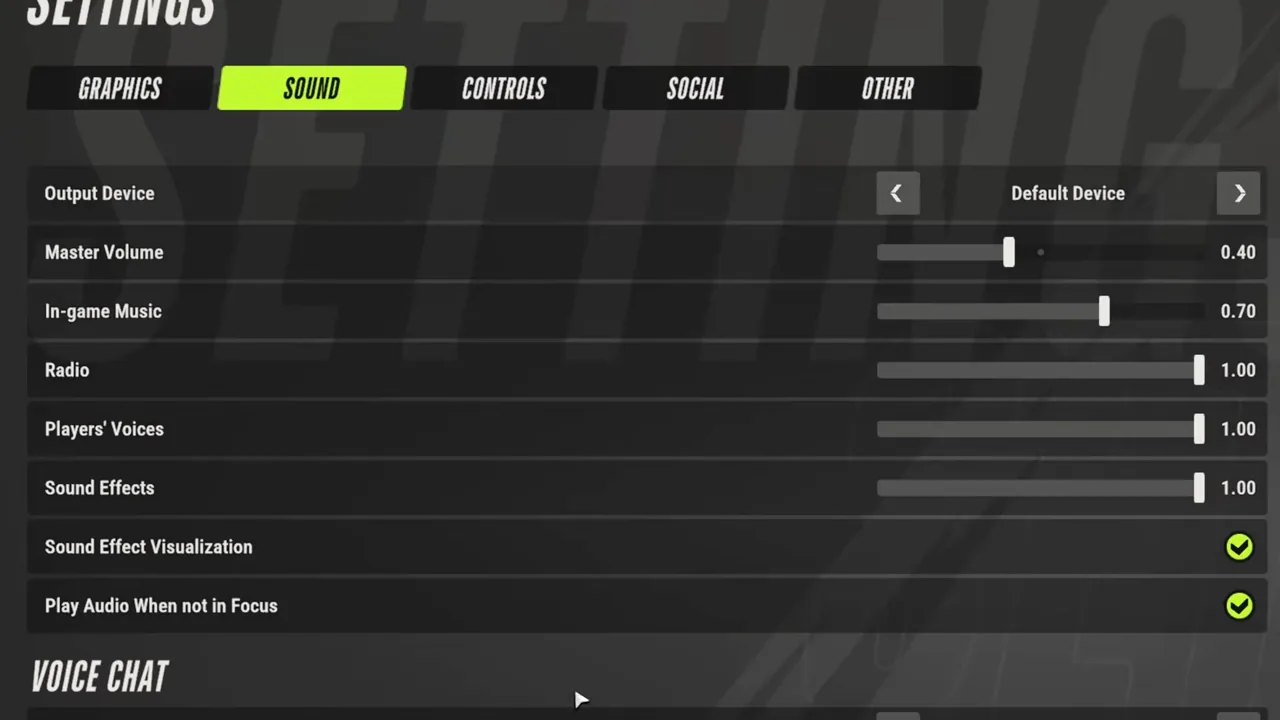
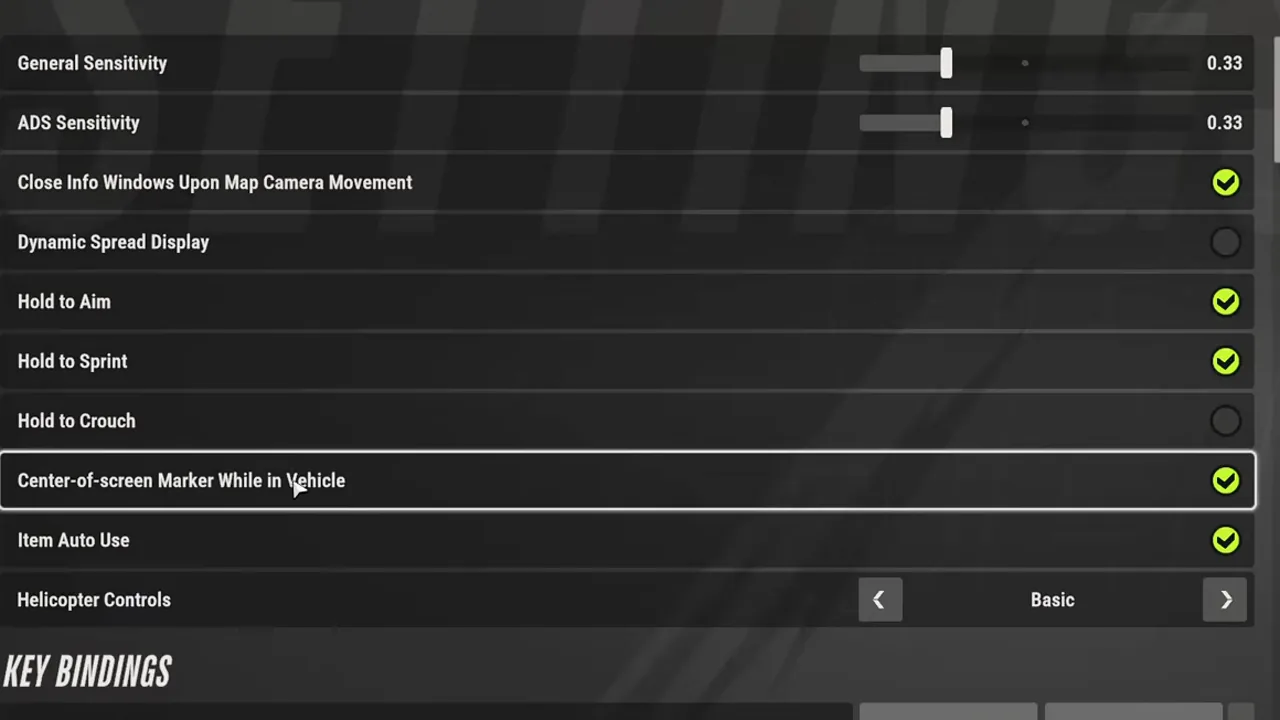
Sound Effect Visualization puts sirens and footsteps on your screen. The vehicle marker shows a dot in the middle of the screen while you drive; Lex uses it to spot criminals from a car. Lex and This is Shran both turn on these two.
System requirements
Kefir's help center and the Steam store give the same table; the storage line is also the install size.
| Part | Minimum | Recommended |
|---|---|---|
| OS | Windows 10 or later, 64-bit | Windows 10 or later, 64-bit |
| CPU | Intel Core i5-6600K / AMD Ryzen 5 1600 | Intel Core i5-9600K / AMD Ryzen 5 3600 |
| RAM | 12 GB | 16 GB |
| GPU | GTX 1050 Ti / RX 580 / Intel Arc A380 | RTX 2070 / RX 5700 XT / Intel Arc B570 |
| DirectX | 11 | 11 |
| Network | Broadband | Broadband |
| Storage | 20 GB | 20 GB |
The game is free to play, so the download is the only cost. ROB RUN is Windows only on Steam; Mac, Linux and consoles are covered on PS5 and Xbox.
Still crashing after this?
If the settings are fine and the game still freezes, crashes or won't start, the cause is usually not graphics.
For crashes that keep coming back, Kefir asks you to send support your PC specs, a description of the crash and the error text.
FAQ
What are the best settings for ROB RUN?
On a strong PC: Render Resolution 1.0, Shadows Medium, Texture High, Level of Detail 1.0 to 1.5, Motion Blur and VSync off. On a weak PC: Render Resolution 0.8 to 0.9, Shadows Disabled, Post-processing off, Level of Detail 0.8 and Grass Minimum.
Why does my FPS drop when I move the mouse in ROB RUN?
Kefir's help center blames a mouse polling rate that is too high. Lower it in your mouse's app (try 1000 Hz, then 500 Hz), then update GPU drivers and BIOS and turn off overlays.
What are ROB RUN's system requirements?
Minimum: Windows 10 64-bit, Core i5-6600K or Ryzen 5 1600, 12 GB RAM, GTX 1050 Ti or RX 580. Recommended: Core i5-9600K or Ryzen 5 3600, 16 GB RAM, RTX 2070 or RX 5700 XT. Both need 20 GB of space.
How big is ROB RUN?
About 20 GB: that is the storage line in both the minimum and the recommended spec on the Steam store.
How do I show FPS in ROB RUN?
Turn on Settings, Other, Display performance metrics. It shows FPS, ping and packet loss while you play.
What are the controls in ROB RUN?
Community guides list these defaults; change any of them under Esc, Settings, Controls (ShowGamer, LagoFast):
- H: Shipments
- Tab: party
- T: talk
- B: aim in first person
- X: switch shoulder
- Z: holster
The 17 Nov patch added an option to invert the mouse.
Is there voice chat in ROB RUN?
Yes, push-to-talk on T by default; rebind it under Settings, Controls, Voice Chat Key. Since the 17 Nov patch, players with no land plot and no jail time can't use it in the Prison or at Lenny's Motel.
Sources
15 sources, checked 17 Nov 2026
- What are the system requirements?, checked 17 Nov 2026
- What should I do if my FPS drops drastically when moving the mouse?, checked 17 Nov 2026
- The game won't load or keeps freezing. What should I do?, checked 17 Nov 2026
- What should I do if the game crashes?, checked 17 Nov 2026
- ROB RUN on Steam (system requirements), checked 17 Nov 2026
- ROB RUN Best Graphics Settings 2026 | Max FPS & Best Visuals (Fuzzi Official ツ), checked 17 Nov 2026
- BEST SETTINGS for ROB RUN (FPS BOOST WITHOUT LOSING QUALITY) (SimDEX), checked 17 Nov 2026
- ROB RUN Best Settings: Turn These On NOW (More FPS + Unfair Edge) (Lex), checked 17 Nov 2026
- ROB RUN : The ULTIMATE PC Guide – MAX FPS, Visibility & Mouse Stutter Fix! (Kephren), checked 17 Nov 2026
- ROB RUN Best Settings for More FPS and a Competitive Edge (This is Shran), checked 17 Nov 2026
- ROB RUN PC Settings: Fix FPS Drops and Mouse Stutter (hone.gg), checked 17 Nov 2026
- ROB RUN: как исправить просадки FPS, лаги и зависания (ShowGamer, in Russian), checked 17 Nov 2026
- Patch Notes (17 Nov), checked 18 Nov 2026
- How to Go First Person in ROB RUN and ROB RUN Prison Guide (ShowGamer), checked 18 Nov 2026
- ROB RUN Voice Chat Not Working? (LagoFast) and How to Enable Voice Chat in ROB RUN (Global Success Narratives, YouTube), checked 18 Nov 2026